Run MyVirtual Machine - SINUMERIK CNC Digital Twin
Run MyVirtual Machine brings the SINUMERIK CNC digital twin to the office for CNC programming, verification, and training using high-fidelity simulation.
Información general del producto
Run MyVirtual Machine brings the SINUMERIK CNC digital twin to the office for CNC programming, verification, and training using high-fidelity simulation.
Create, validate, and optimize NC programs offline with Run MyVirtual Machine, the digital twin of SINUMERIK CNC, and enable realistic CNC training.
• Get started using generic machines. Run MyVirtual Machine comes with a set of generic machine tool models—ranging from simple 3-axis machines to advanced 5-axis configurations and robotic cells. These models are ideal for training and CNC programming, but they do not represent the exact specifications of your actual machine.
• Simple digital twin based on machine archive: Using a backup archive from your SINUMERIK machine, you can create a simple digital twin that mirrors the NC-specific behavior of your machine. However, it uses a generic PLC controller and does not support 3D kinematic simulation. This cost-efficient solution is well suited for CNC programming, cycle-time estimation, and testing post-processors and machining cycles.
• OEM-specific digital twin: The most sophisticated solution is a digital twin derived directly from the engineering data of your machine tool. It includes the actual NC and PLC behavior, all OEM-specific HMI software extensions, as well as a complete 3D kinematics model. It covers all use cases, including 3D collision analysis.
• Run MyVirtual Machine /Operate is the basic runtime environment for the digital twin of your machine tool. In addition, it provides the familiar SINUMERIK Operate environment for CNC programming, including ShopMill and ShopTurn, as well as various SINUMERIK options.
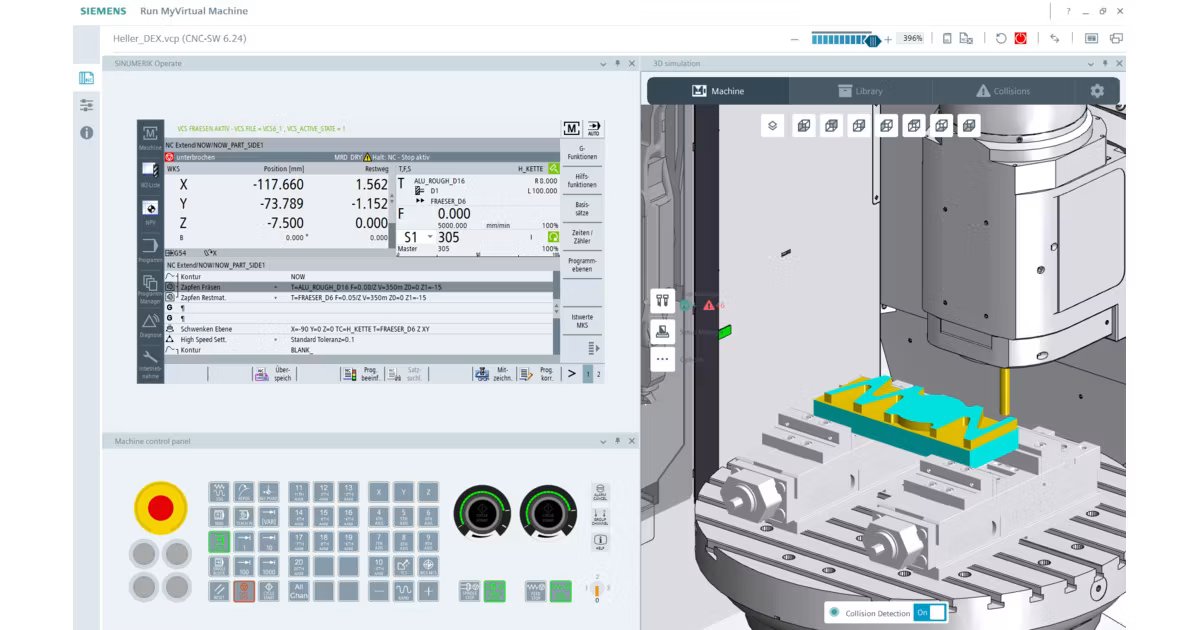
• Run MyVirtual Machine /3D is an optional extension to Run MyVirtual Machine /Operate. It provides detailed 3D visualization of the machine's working area, including clamping, tools, and material removal throughout all phases of the NC program. This allows potential collisions to be identified and eliminated in advance, ensuring maximum process reliability before production.
• Run MyVirtual Machine /Open is an optional extension to Run MyVirtual Machine /Operate that provides an open API to the virtual CNC. It enables integration with third-party simulation systems, CAM solutions, and other software components by allowing external applications to exchange signals with the virtual control during runtime.
• Run MyVirtual Machine /SIMIT Connector is an optional extension to Run MyVirtual Machine /Operate. It enables the connection of virtual CNC machines to the SIEMENS SIMIT simulation environment. A typical use case is the simulation of complex automation systems with multiple interconnected machines.
• Supported CNC controls – SINUMERIK ONE – SINUMERIK 828D (starting with CNC software version 5.25)
• Supported machines: Run MyVirtual Machine works with a wide range of milling, turning, and multi-technology machines from various machine tool manufacturers, including robots.
• OEM-specific solutions: Siemens works closely with selected machine tool OEMs to offer joint solutions, in which Run MyVirtual Machine is delivered with an OEM-specific digital twin that is precisely aligned with the actual machine configuration.
• Use CAM simulation to quickly validate toolpaths, machining strategies, and geometry while programming in CAM.
• Use Run MyVirtual Machine to verify how the NC program will be executed by the actual SINUMERIK CNC—offline on a PC—before machining, and for realistic operator training.
• Add "Run MyVirtual Machine /3D" when you need detailed workspace visualization, material removal simulation, and early detection of potential collisions.
• Add "Run MyVirtual Machine" / Open only when API-based integration with third-party systems is required, enabling runtime data exchange with external simulation or software components.
• TRAK Run MyVirtual Machine
• MAG Digital Twin with Run MyVirtual Machine
• DMG MORI Run MyVirtual Machine
• HELLER Tokn & Digital Twin – The Perfect Match for Training
SINUMERIK ONE is the digital-native CNC that maximizes machine tool productivity. Innovate faster through the seamless interaction between the virtual and real worlds.
The powerhouse in the compact CNC class. SINUMERIK 828 sets productivity benchmarks for milling, turning, and grinding machines.
Simulate and validate machining processes digitally to reduce risks, speed up production, and improve machining efficiency.
The Run MyVirtual Machine solution brings your CNC shop floor directly into the office. It runs digital twins of your machine tools based on original Siemens CNC and PLC controller technology, supplemented by a powerful 3D simulation of machine kinematics and the material-removal process. The solution supports a wide range of use cases, from CNC programming and verification to training.
Take shop-floor-oriented programming from the machine to the office and prepare your CNC process virtually. Free up your actual machines so they can focus on what they do best—cutting metal.
Verify CNC programs on the virtual machine to prevent unexpected issues when the program is released to production. Detect collisions early and avoid costly repairs and machine downtime.
Train operators on a realistic virtual machine featuring the original SINUMERIK HMI and a true-to-life environment—ideal for learning workflows safely, without risk, scrap, or machine downtime.
Simulate NC programs using actual SINUMERIK control logic to ensure machine-accurate behavior before execution on the shop floor. Test machining cycles and post-processors without relying on the availability of the actual machine.
Use the same operating and programming interface as the actual SINUMERIK machine, eliminating the need to relearn and ensuring a seamless transition from the virtual machine to the actual machine.
Simulate the entire machine, including axes, tooling, holders, fixtures, and the workpiece, to validate realistic motion and behavior.
Detect collisions between machine components, tooling, and workpieces early to prevent machine damage, scrap, and unplanned downtime.
Using a SINUMERIK ONE-controlled DMG MORI machine and Digital Twin technology, Rusch Maschinenteile reduced cycle times by about 20% and eliminated up to 80% of manual programming tasks through automated 3D shop-floor programming.
Run MyVirtual Machine supports a wide range of use cases across the entire CNC workflow—from programming and validation to training and optimization. Based on the control-identical Digital Twin of SINUMERIK, it enables safe, offline work preparation and realistic simulation that mirrors actual machine behavior before machining begins. Create CNC programs
Run MyVirtual Machine is the offline programming station for SINUMERIK machine tools. In addition to G-code, you can use the powerful, cycle-based ShopMill and ShopTurn programming environments at no additional cost. With the optional Optimize MyProgramming /3D Scanner, even 3D CAD data can be used directly for programming.
With the control-identical Digital Twin, Run MyVirtual Machine behaves exactly like the actual CNC machine. NC programs can be verified offline to ensure error-free execution, correct tool changes, and realistic cycle times. This supports more accurate planning, reliable cost calculations, and predictable production results.
Detect collisions and simulate material removal
Using the optional 3D simulation, the exact movements of all machine components—including axes, tools, and tool changes—are visualized. Potential collisions are detected and logged early, allowing programs to be optimized before machining. Virtual probing can also be used to check the final workpiece geometry. In combination with Protect MyMachine /3D Twin, the collision protection concept can be extended to the shop floor, enabling real-time collision monitoring on the actual machine based on the same digital twin—further increasing machine safety and process reliability.
With the authentic SINUMERIK Operate interface and optional hardware-in-the-loop panels, operators interact exactly as they would on the actual machine. The machine-centric simulation replicates every step—from programming and probing to the finished workpiece—enabling safe, risk-free training without simplification.
Run MyVirtual Machine complements CAM by validating how an NC program will behave on the actual control—offline on a PC. In general, CAM (such as NX CAM) creates toolpaths and outputs NC code; Run MyVirtual Machine then executes that NC code with SINUMERIK behavior identical to that of the actual control, enabling high-confidence verification before machining. If you need to connect third-party systems, Run MyVirtual Machine /Open provides an open API that allows external applications to exchange signals with the virtual control during runtime—typical use cases include integration into third-party 3D simulation systems and CAM systems. Run MyVirtual Machine is directly integrated into the NX CAM workflow, enabling a seamless transition from CAM programming to control-identical validation.
In addition to the Run MyVirtual Machine software, you need a digital twin model of your machine (VCP)—available through various options depending on how closely the virtual environment should match your actual machine:
Siemens works with selected machine tool OEMs to provide joint solutions, in which Run MyVirtual Machine is delivered as part of an OEM-specific digital twin package—fully aligned with the actual machine and supported by the OEM.
Run MyVirtual Machine – Available Options
Run MyVirtual Machine is a modular solution that scales to meet your needs—choose from a range of options to perfectly match your requirements:
Run MyVirtual Machine is designed for machine tools equipped with SINUMERIK CNC systems.
Yes. SIEMENS collaborates with selected machine tool OEMs to offer OEM-specific digital twin solutions, including Run MyVirtual Machine. These joint offerings are available through the Siemens Xcelerator Marketplace. .
They are based on real machine engineering data and fully aligned with the actual machine configuration, combining control-identical SINUMERIK behavior with OEM-specific machine models. This enables highly realistic NC validation, simulation, and operator training—supported jointly by Siemens and the respective OEM.
Create MyVirtual Machine & Run MyVirtual Machine
Virtual Machine Training – SINUMERIK Live #17
Smarter Manufacturing with Virtual SINUMERIK – SINUMERIK Live #19
Online Support | Create a New Support Request
Datos para evaluación técnica.
Aplicaciones
- Run MyVirtual Machine complements CAM by simulating how an NC program will behave on the actual control system—offline on a PC. In general
- CAM (like NX CAM) creates toolpaths and generates NC code
- Run MyVirtual Machine then executes that NC code with SINUMERIK behavior that is identical to the actual control system, for high-confidence verification before machining. If you need to connect third-party systems
- Run MyVirtual Machine /Open provides an open API that allows external applications to exchange signals with the virtual control during runtime—typical use cases include integration into third-party 3D simulation systems and CAM systems. Run MyVirtual Machine is directly integrated into the NX CAM workflow
- enabling a seamless transition from CAM programming to validation under identical control conditions.
- Run MyVirtual Machine /Open is an optional extension to Run MyVirtual Machine /Operate that provides an open API to the virtual CNC. It enables integration with third-party simulation systems
- CAM Solutions
- and other software components by allowing external applications to exchange signals with the virtual controller at runtime.
Especificaciones
- OEM-specific digital twin: The most sophisticated solution is a digital twin derived directly from the engineering data of your machine tool. It includes the actual NC and PLC behavior
- all OEM-specific HMI software extensions
- as well as a complete 3D kinematics model. It covers all use cases, including 3D collision analysis.
- Run MyVirtual Machine /3D is an optional extension to Run MyVirtual Machine /Operate. It adds detailed 3D visualization of the machine's work area
- including clamping
- tools
- and material removal throughout all phases of the NC program. This allows potential collisions to be identified and eliminated in advance
- ensuring maximum process reliability before production.
- Add "Run MyVirtual Machine /3D" when you need a detailed visualization of your workspace
- material removal simulation
- and early detection of potential collisions.
También puede interesarle.
 Spanish
  English